|
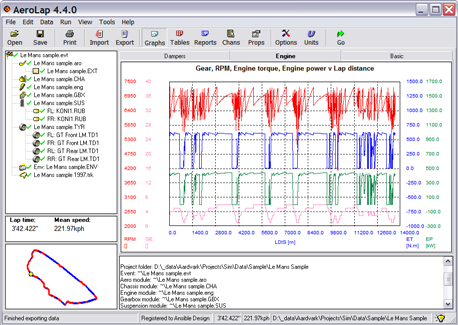
AeroLap is a fully featured, professional race car lap
simulator that allows you to predict the results of changes to
the set-up of your car in terms of maximum performance around a
fixed track time. Basic use is straightforward:
1 Set up the model of the car just
as you would the real car using a series of set-up pages, one
for each major module of the car. See
defining the car for
more details.
2 Choose a track or generate
one from acquired data.
3 Click Go and watch while
the simulation calculates the fastest possible theoretical lap
for the car setup and track you defined.
4 View the results
graphically, numerically or as a report, overlaying simulated
channels on data acquired from the car or on the last simulation
lap.
5 Make changes to the set-up, re-run the simulation
and compare the results, all in far less than the time it takes
the car to run a lap on the track.
On-track performance for a flying lap is calculated with over
200 different channels available for inspection, just like the data
acquisition on the car, including some channels not possible or
very difficult to measure on a car.
Using complex, multi-layered physics and driver models with many non-linear
components, and performing hundreds of thousands of calculations
for a run, AeroLap can provide more realistic and accurate
results than other methods. The results of those calculations are presented in a
way that is easy to interpret, using the same skills as for the
on-car acquisition.
Parameter sweeps may be performed directly from the user interface,
with results displayed numerically and graphically, with optional data export for each
run during the sweep. Advanced users can optionally leverage the ActiveX
interface to the calculation engine to access every single
property of the simulation and to automate the running of
simulations, e.g. for optimisation.
An additional licence option provides access to advanced powertrains
(all-electric plus various hybrid options) with additional configurable driver functions (boost,
power-conserving lift-off etc.) with track-based activation.
The underlying calculation method is to discretise a given 3D
path into small segments. For each segment the maximum thrust is
applied to the car, according to the authority of the engine or
braking system and limited by the grip available, driver
behaviour and other forces on the car e.g. aero or gravity. A
pseudo steady state solution is found for the sprung mass
position and the solver focus moves to another segment. Segments
are solved in the most efficient order, which is often not
sequentially. When all segments have been solved the results can
be presented as a continuous time history.
|


 Decide
race engineering strategy before going to the track.
Decide
race engineering strategy before going to the track.